
Chat inside the application
Ask operational questions from the embedded chat in the society management web or mobile application.
PROJECT OVERVIEW / Knowledge-based AI support
An embedded support agent for a society management web and mobile application. Users and administrators ask operational questions and receive natural English answers drawn from the knowledge available to their role.
THE PROJECT
The agent sits inside a society management application’s chat window, helping users and administrators understand how to use its operational features. Questions are matched to approved knowledge, and the agent responds in concise, natural English.
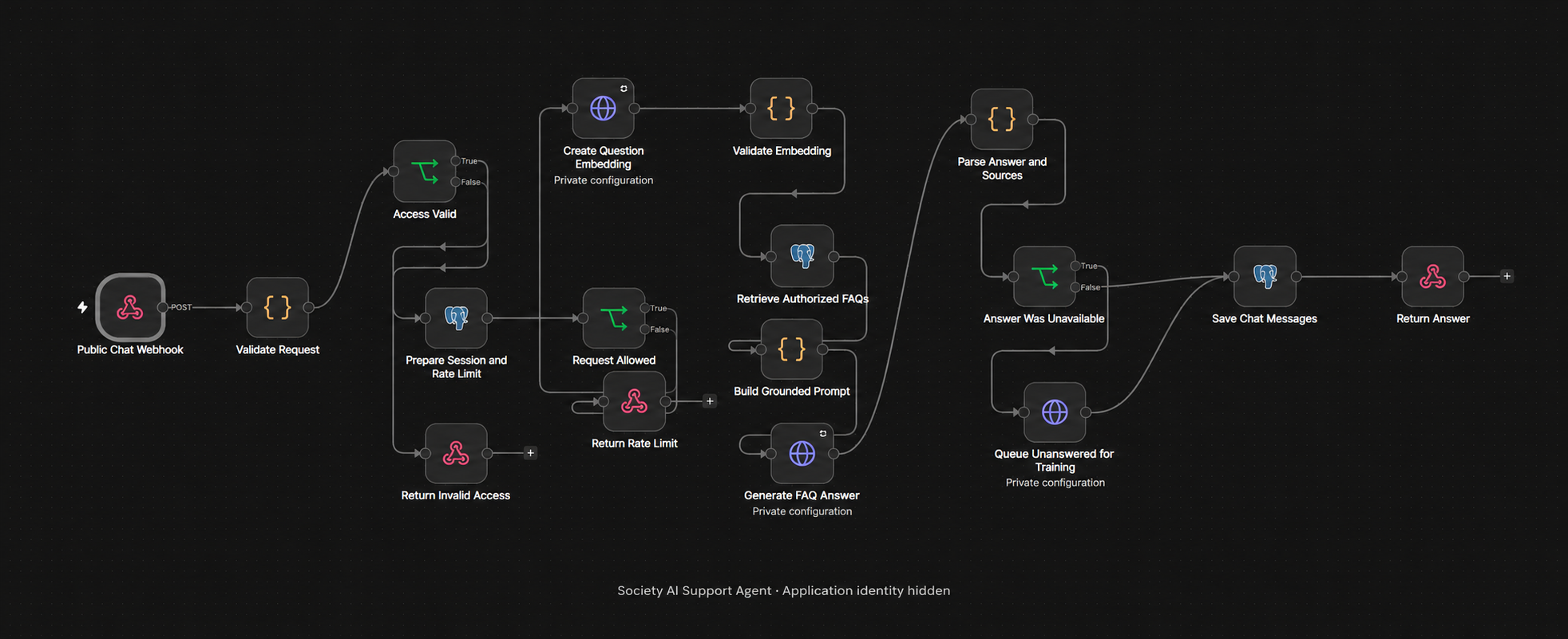
Access follows the person’s role: users receive answers from general and user knowledge, while administrators can also access administrator guidance. The workflow validates requests, applies rate limits, retrieves relevant authorised FAQs and uses that context to generate an answer. Recent conversation history helps interpret follow-up questions.
When the knowledge base cannot support an answer, the agent directs the person to support and queues the unanswered question for review. A separate training portal lets a trainer prepare an answer and an administrator approve, return or reject it. Approved answers are published to the knowledge base for future questions. The application’s name, domains and configuration remain private.
WHAT IT BRINGS TOGETHER
Ask operational questions from the embedded chat in the society management web or mobile application.
Match answers to general, user and administrator knowledge levels so administrative guidance follows the person’s access.
Retrieve relevant FAQs through semantic search and use the supplied knowledge to generate concise English responses.
Use recent chat history to interpret follow-ups, with request validation, access checks and rate limits around the conversation.
Provide a support fallback when information is unavailable and queue the question for the knowledge-review process.
Trainers prepare answers for administrator review. Approved content is published with its knowledge-access level for future use.
THE USER JOURNEY
A user or administrator asks an operational question in the embedded chat.
The workflow checks access, retrieves authorised knowledge and returns a natural English answer.
Questions without a supported answer are queued for human review and an approved knowledge update.
HUMAN REVIEW & KNOWLEDGE UPDATES
A separate training portal turns gaps in the knowledge base into answers reviewed and approved by an administrator.
Unanswered questions enter the training portal, where a trainer prepares or revises a proposed answer.
An administrator reviews the proposal and its access level, then approves it, returns it for revision or rejects it.
Approval publishes the answer and its search embedding to the knowledge base, making it available to authorised future conversations.
MORE RECENT WORK